
Spring Cloud Gateway 为 SpringBoot 应用提供了API网关支持,具有强大的智能路由与过滤器功能。
# Spring Cloud Gateway 网关服务
Gateway是在Spring生态系统之上构建的API网关服务,基于Spring 5,Spring Boot 2和 Project Reactor等技术。Gateway旨在提供一种简单而有效的方式来对API进行路由,以及提供一些强大的过滤器功能, 例如:熔断、限流、重试等。
Spring Cloud Gateway 具有如下特性:
- 基于Spring Framework 5, Project Reactor 和 Spring Boot 2.0 进行构建;
- 动态路由:能够匹配任何请求属性;
- 可以对路由指定 Predicate(断言)和 Filter(过滤器);
- 集成Hystrix的断路器功能;
- 集成 Spring Cloud 服务发现功能;
- 易于编写的 Predicate(断言)和 Filter(过滤器);
- 请求限流功能;
- 支持路径重写。
# 相关概念
- Route(路由):路由是构建网关的基本模块,它由ID,目标URI,一系列的断言和过滤器组成,如果断言为true则匹配该路由;
- Predicate(断言):指的是Java 8 的 Function Predicate。 输入类型是Spring框架中的ServerWebExchange。 这使开发人员可以匹配HTTP请求中的所有内容,例如请求头或请求参数。如果请求与断言相匹配,则进行路由;
- Filter(过滤器):指的是Spring框架中GatewayFilter的实例,使用过滤器,可以在请求被路由前后对请求进行修改。
# 创建网关服务
添加一个api-gateway模块,并添加相关依赖:
<dependency>
    <groupId>org.springframework.cloud</groupId>
    <artifactId>spring-cloud-starter-gateway</artifactId>
</dependency>
# 配置路由
通过application.yml配置:
server:
  port: 9201
spring:
  cloud:
    gateway:
      routes:
        - id: path_route #路由的ID
          uri: http://localhost:9101/user/{id} #目标地址
          predicates: # 断言,路径相匹配的进行路由
            - Path=/user/{id}
通过Java Bean配置:
@Configuration
public class GatewayConfig {
    @Bean
    public RouteLocator customRouteLocator(RouteLocatorBuilder builder) {
        return builder.routes()
                .route("path_route2", r -> r.path("/user/all")
                        .uri("http://localhost:9101/user/all"))
                .build();
    }
}
# predicates
Spring Cloud Gateway将路由匹配作为Spring WebFlux HandlerMapping基础架构的一部分。 Spring Cloud Gateway包括许多内置的Route Predicate工厂。 所有这些Predicate都与HTTP请求的不同属性匹配。 多个Route Predicate工厂可以进行组合,下面我们来介绍下一些常用的Route Predicate。
格式:
spring:
  cloud:
    gateway:
      routes:
        - id: after_route
          uri: ${service-url.user-service}
          predicates:
            - Method=GET
# After
在指定时间之后的请求会匹配该路由。
- After=2019-09-24T16:30:00+08:00[Asia/Shanghai]
# Before
在指定时间之前的请求会匹配该路由。
- Before=2019-09-24T16:30:00+08:00[Asia/Shanghai]
# Between
在指定时间区间内的请求会匹配该路由。
- Between=2019-09-24T16:30:00+08:00[Asia/Shanghai], 2019-09-25T16:30:00+08:00[Asia/Shanghai]
# Cookie
带有指定Cookie的请求会匹配该路由。
Cookie=username,xiaoyu
使用curl测试:
curl http://localhost:9201/user/1 --cookie "username=xiaoyu"
# Header
带有指定请求头的请求会匹配该路由。
- Header=X-Request-Id, \d+
使用curl测试:
curl http://localhost:9201/user/1 -H "X-Request-Id:123"
# Host
带有指定Host的请求会匹配该路由。
- Host=**.xiaoyulive.top
使用curl测试:
curl http://localhost:9201/user/1 -H "Host:www.xiaoyulive.top"
# Method
发送指定方法的请求会匹配该路由。
- Method=GET
使用curl测试:
curl http://localhost:9201/user/1 # 正常匹配
curl -X POST http://localhost:9201/user/1 # 无法匹配
# RemoteAddr
从指定远程地址发起的请求可以匹配该路由。
- RemoteAddr=192.168.1.1/24
使用curl测试:
curl http://localhost:9201/user/1
# Path
发送指定路径的请求会匹配该路由。
spring:
  cloud:
    gateway:
      routes:
        - id: path_route
          uri: ${service-url.user-service}/user/{id}
          predicates:
            - Path=/user/{id}
使用curl工具发送/user/1路径请求可以匹配该路由。
curl http://localhost:9201/user/1
使用curl工具发送/abc/1路径请求无法匹配该路由。
curl http://localhost:9201/abc/1
# Query
带指定查询参数的请求可以匹配该路由。
spring:
  cloud:
    gateway:
      routes:
        - id: query_route
          uri: ${service-url.user-service}/user/getByUsername
          predicates:
            - Query=username
使用curl工具发送带username=xiaoyu查询参数的请求可以匹配该路由。
curl http://localhost:9201/user/getByUsername?username=xiaoyu
使用curl工具发送带不带查询参数的请求无法匹配该路由。
curl http://localhost:9201/user/getByUsername
# Weight
使用权重来路由相应请求,以下表示有80%的请求会被路由到localhost:9101,20%会被路由到localhost:8202。
spring:
  cloud:
    gateway:
      routes:
      - id: weight_high
        uri: http://localhost:9101
        predicates:
        - Weight=group1, 8
      - id: weight_low
        uri: http://localhost:8202
        predicates:
        - Weight=group1, 2
# filters
路由过滤器可用于修改进入的HTTP请求和返回的HTTP响应,路由过滤器只能指定路由进行使用。Spring Cloud Gateway 内置了多种路由过滤器,他们都由GatewayFilter的工厂类来产生,下面我们介绍下常用路由过滤器的用法。
# StripPrefix
对指定数量的路径前缀进行去除的过滤器。
spring:
  application:
    name: api-gateway
  cloud:
    gateway:
      routes:
        - id: path_route #路由的ID
          uri: http://localhost:9101
          predicates:
            - Path=/consul-client/**
          filters:
            - StripPrefix=1
以上配置会把以/consul-client/开头的请求的路径去除两位,通过curl工具使用以下命令进行测试。
curl http://localhost:9201/consul-client/test/test
相当于发起该请求:
curl http://localhost:9101/test/test
# PrefixPath
与StripPrefix过滤器恰好相反,会对原有路径进行增加操作的过滤器。
spring:
  cloud:
    gateway:
      routes:
        - id: prefix_path_route
          uri: http://localhost:9101
          predicates:
            - Method=GET
          filters:
            - PrefixPath=/user
以上配置会对所有GET请求添加/user路径前缀,通过curl工具使用以下命令进行测试。
curl http://localhost:9201/test
相当于发起该请求:
curl http://localhost:9101/test/test
# AddRequestParameter
给请求添加参数的过滤器。
spring:
  cloud:
    gateway:
      routes:
        - id: add_request_parameter_route
          uri: http://localhost:9101
          filters:
            - AddRequestParameter=username, xiaoyu
          predicates:
            - Method=GET
以上配置会对GET请求添加username=xiaoyu的请求参数,通过curl工具使用以下命令进行测试。
curl http://localhost:9201/user/getByUsername
相当于发起该请求:
curl http://localhost:9101/user/getByUsername?username=xiaoyu
# Retry
对路由请求进行重试的过滤器,可以根据路由请求返回的HTTP状态码来确定是否进行重试。
spring:
  cloud:
    gateway:
      routes:
      - id: retry_route
        uri: http://localhost:9101
        predicates:
        - Method=GET
        filters:
        - name: Retry
          args:
            retries: 1 #需要进行重试的次数
            statuses: BAD_GATEWAY #返回哪个状态码需要进行重试,返回状态码为5XX进行重试
            backoff:
              firstBackoff: 10ms
              maxBackoff: 50ms
              factor: 2
              basedOnPreviousValue: false
当调用返回500时会进行重试,访问测试地址:http://localhost:9201/user/111
可以发现user-service控制台报错2次,说明进行了一次重试。
# 结合Eureka注册中心使用
首先在api-gateway中添加依赖:
<dependency>
    <groupId>org.springframework.cloud</groupId>
    <artifactId>spring-cloud-starter-netflix-eureka-client</artifactId>
</dependency>
修改api-gateway配置:
server:
  port: 9201
spring:
  application:
    name: api-gateway
  redis:
    host: localhost
    port: 6379
  cloud:
    gateway:
      routes:
        - id: prefixpath_route
          uri: lb://eureka-client #此处需要使用lb协议
          predicates:
            - Method=GET
          filters:
            - PrefixPath=/test
      discovery:
        locator:
          enabled: true #开启从注册中心动态创建路由的功能
          lower-case-service-id: true #使用小写服务名,默认是大写
eureka:
  client:
    service-url:
      defaultZone: http://localhost:8001/eureka/
在结合注册中心使用过滤器的时候,我们需要注意的是uri的协议为lb,这样才能启用Gateway的负载均衡功能。
启动api-gateway、eureka-server和eureka-client,访问http://localhost:9201/test,将路由到http://localhost:8101/test/test
# 结合Hystrix断路器使用
首先添加Hystrix依赖:
<dependency>
    <groupId>org.springframework.cloud</groupId>
    <artifactId>spring-cloud-starter-netflix-hystrix</artifactId>
</dependency>
在配置中加入filters.fallbackcmd:
server:
  port: 9201
spring:
  cloud:
    gateway:
      routes:
        - id: path_route
          uri: http://localhost:9101
          predicates:
            - Method=GET
          filters:
            - name: Hystrix
              args:
                name: fallbackcmd
                fallbackUri: forward:/fallback
添加服务降级的处理类:
@RestController
public class FallbackController {
    @GetMapping("/fallback")
    public Object fallback() {
        Map<String,Object> result = new HashMap<>();
        result.put("data",null);
        result.put("message","Get request fallback!");
        result.put("code",500);
        return result;
    }
}
测试:关闭9101端口的服务,访问http://localhost:9201/test/test,返回结果:
{
  "code": 500,
  "data": null,
  "message": "Get request fallback!"
}
# 限流策略(RequestRateLimiter)
RequestRateLimiter 过滤器可以用于限流,使用RateLimiter实现来确定是否允许当前请求继续进行,如果请求太大默认会返回HTTP 429-太多请求状态。
首先添加依赖:
<dependency>
    <groupId>org.springframework.boot</groupId>
    <artifactId>spring-boot-starter-data-redis-reactive</artifactId>
</dependency>
添加限流策略的配置类:
@Configuration
public class RedisRateLimiterConfig {
    // 根据请求参数中的username进行限流
    @Bean
    public KeyResolver userKeyResolver() {
        return exchange -> Mono.just(exchange.getRequest().getQueryParams().getFirst("username"));
    }
    // 根据访问IP进行限流
//    @Bean
//    public KeyResolver ipKeyResolver() {
//        return exchange -> Mono.just(exchange.getRequest().getRemoteAddress().getHostName());
//    }
}
我们使用Redis来进行限流,所以需要添加Redis和RequestRateLimiter的配置,这里对所有的GET请求都进行了按IP来限流的操作;
server:
  port: 9201
spring:
  application:
    name: api-gateway
  redis:
    host: localhost
    port: 6379
  cloud:
    gateway:
      routes:
        - id: requestratelimiter_route
          uri: http://localhost:9101
          filters:
            - name: RequestRateLimiter
              args:
                redis-rate-limiter.replenishRate: 1 #每秒允许处理的请求数量
                redis-rate-limiter.burstCapacity: 1 #每秒最大处理的请求数量
                key-resolver: "#{@userKeyResolver}" #限流策略,对应策略的Bean
          predicates:
            - Method=GET
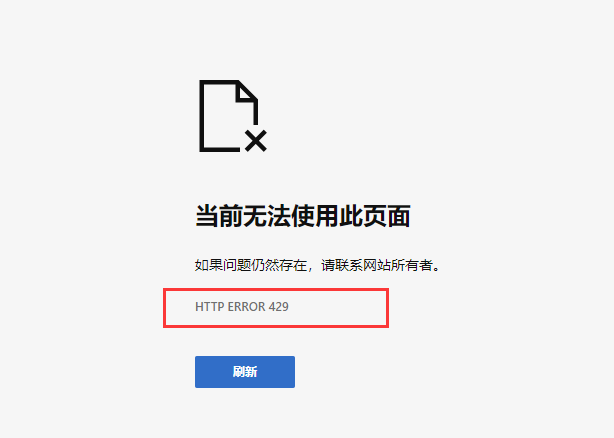
启动redis,多次访问http://localhost:9201/test/test?username=1,返回429:
# 错误处理
org.springframework.cloud.gateway.config.GatewayAutoConfiguration required a bean of type 'org.springframework.http.codec.ServerCodecConfigurer' that could not be found
将pom.xml中关于spring-boot-start-web模块依赖去掉。
# 参考资料
版权声明:著作权归作者所有。商业转载请联系作者获得授权,非商业转载请注明出处。
文章标题:Spring Cloud Gateway 网关服务
原文链接://www.xiaoyulive.top/categories/java/spring-cloud-gateway.html
发表日期:2020-04-07